
What is a Kitchen Display System and How Does KDS Work
Share This Story, Choose Your Platform!
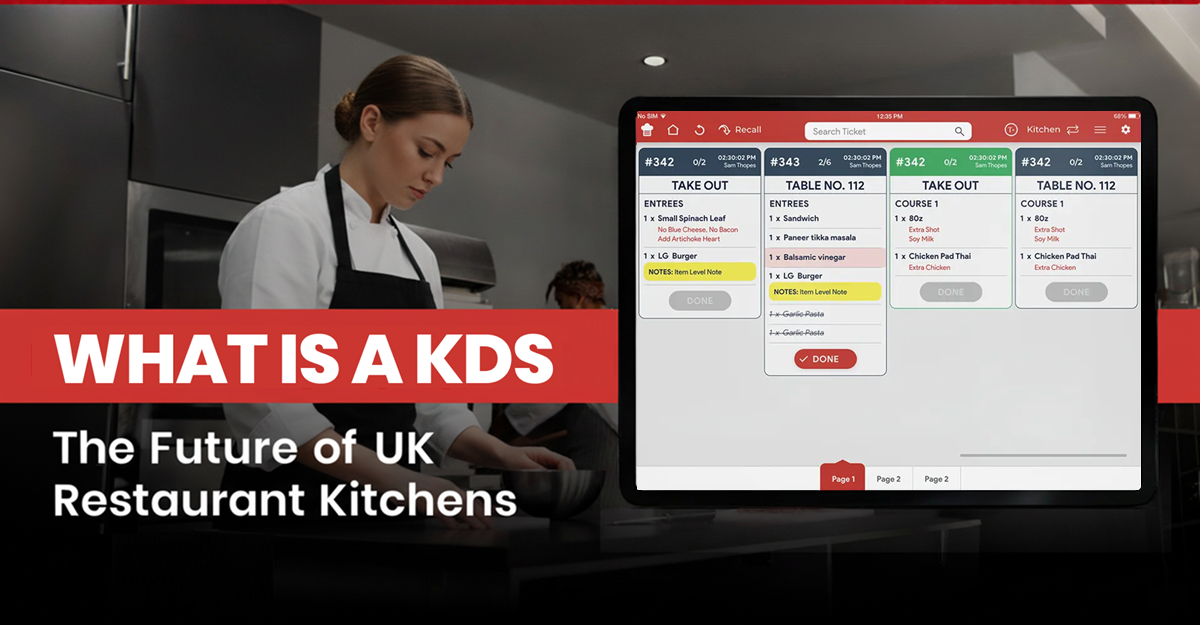
Table of Content
Quick Answer – A Kitchen Display System (KDS) is a digital solution that replaces paper kitchen tickets by displaying restaurant orders on kitchen screens in real time. It helps UK restaurants improve order accuracy, kitchen communication, preparation times, order routing, and operational visibility. A modern KDS can also connect with POS, online ordering, and delivery channels, helping restaurants manage orders more efficiently and deliver faster, more consistent service.
In the ever-changing hospitality industry, kitchens in the United Kingdom are experiencing a phenomenal transformation. The pressure on kitchens to provide quicker, more precise, and seamless service has never been higher due to increasing customer expectations and increased competition.
The UK hospitality sector employs around 3.6 million people and contributes approximately £96 billion annually to the UK economy, highlighting the scale and importance of efficient restaurant operations.
The Kitchen Display System (KDS) is the main centre of this change; it’s a robust digital tool that redefines efficiency, accuracy, and productivity in the restaurant industry by replacing traditional paper tickets and kitchen printers.
For modern kitchens, a KDS signifies more than simply a screen behind the line. This article explores valuable insights from the hospitality industry and Quantic’s vision on how KDS technology is shaping the future of UK restaurant operations.
What Is a Kitchen Display System
“A kitchen display system is a modern digital solution that replaces the traditional paper order tickets used in restaurants.”
It streamlines communication between front-of-house and back-of-house teams, ensuring all orders entered in the POS are transferred to the kitchen in real time.
It helps the kitchen staff and chef to manage, prioritize, and view all orders within a single screen. It reduces the risk of misreading, lost handwritten tickets, and more. It helps the restaurant staff to organize the entire workflow.
The Global Kitchen Display Systems Market size was valued at around USD 520 million in 2024 and is anticipated to grow at a CAGR of about 7.15% during the forecast period of 2025-30, cites.
A modern KDS system offers various advanced features like:
- Smart routing that sends items to the prep station.
- Preparation times that help staff to keep track of cooking time.
- Overdue alerts help to flag delays before they affect the service.
- Performance analytics help managers with insights.
How a KDS Works: The Engine Behind Kitchen Flow
Digital orders sent by point-of-sale systems (like Quantic) are translated into actionable tickets and displayed on screens at various kitchen stations by a kitchen display system.
Depending on your needs, you can color-code, prioritize, or divide these tickets by meal type. The ability to mark items as “done” or “in progress” helps staff track them in real time and reduces miscommunication.
KDS creates a well-coordinated system from a disorganized kitchen. In addition to expediting prep times, this synchronization of order receipt, automated routing, timer display, and status updates also promotes accountability and collaboration.
How KDS fits into a UK kitchen workflow.
- A customer orders at the till, via a QR code, through a delivery aggregator such as Deliveroo, or through an app.
- The order is transmitted instantly to the kitchen screen and routed to the correct station.
- Modifiers, allergens, and special requests are displayed clearly in text, removing the ambiguity of handwriting.
- A timer starts. Screens typically shift colour to green, amber, and red as an order approaches or exceeds the kitchen’s target prep time.
- Staff tap to mark items as ready, and the front-of-house sees the update immediately, so nobody needs to walk over and ask, “Where’s table 7?”
- The managers can review the logs and prep times to identify issues or slow-moving dishes.
What’s the Difference Between KDS and Paper Tickets?
Why UK Restaurants Should Consider a Kitchen Display System (KDS)
Improved Service Speed and Accuracy
According to Epson, 91% of restaurants are interested in automating kitchen operations, while 52% planned to invest in kitchen automation technology in 2024, highlighting the growing demand for digital kitchen workflows.
- Order Management – In the kitchen, KDS has replaced printed order slips and handwritten tickets, which helps reduce issues such as manual errors and lost tickets.
- Order Synchronization – Any changes made in the POS system, such as instructions or modifications, are instantly reflected in the KDS. It helps the kitchen staff to prepare the correct order.
- Real-time Visibility – Orders are automatically routed to the kitchen station, so each staff member can see the items to be prepared. This helps reduce confusion among staff members about which orders are for whom.
Improved Kitchen Productivity
- Order routing – It automatically routes orders to the right kitchen stations, ensuring each station receives the orders it prepares. With Quantic, ticket times are 20- 30% faster compared with paper tickets.
- Kitchen performance tracking – The ticket times allow kitchen staff to track preparation times, check delayed orders, and more. With Quantic KDS implementation, ticket times decreased by 20% and order accuracy increased by 40%.
- POS and KDS integration – When an order is placed using Quantic, display it on the correct kitchen display screen to reduce the communication gap.
Data-Based Decision-Making
- Kitchen performance analytics – It provides real-time visibility into kitchen operations by tracking ticket times, preparation, and completion.
- Menu performance – It analyzes prep times across menu items and operations to check dishes that slow down service, improving kitchen efficiency.
- Operational reporting – KDS data helps managers understand the kitchen order flow, service periods, and kitchen productivity.
Effective Communication
- POS to Kitchen communication – KDS integrates with the POS to ensure orders are sent quickly from FOH to the right kitchen stations.
- Real-time order alerts – It helps kitchen staff receive immediate updates and visual notifications so staff can prepare food without delay.
- Better coordination among teams – The real-time view of servers, kitchen staff, order status, and managers helps to align with the service process.
Excellent Customer Experience
- Fast order management – The KDS streamlines the kitchen workflow and helps them to prepare and serve orders. It reduces ticket times and increases table turnover.
- Enhanced order accuracy – Its digital order displays and real-time synchronization help staff members get accurate order details.
- Consistent guest satisfaction – It helps restaurants provide a seamless dining experience that encourages repeat visits by delivering quick service and enhanced communication between FOH and BOH.
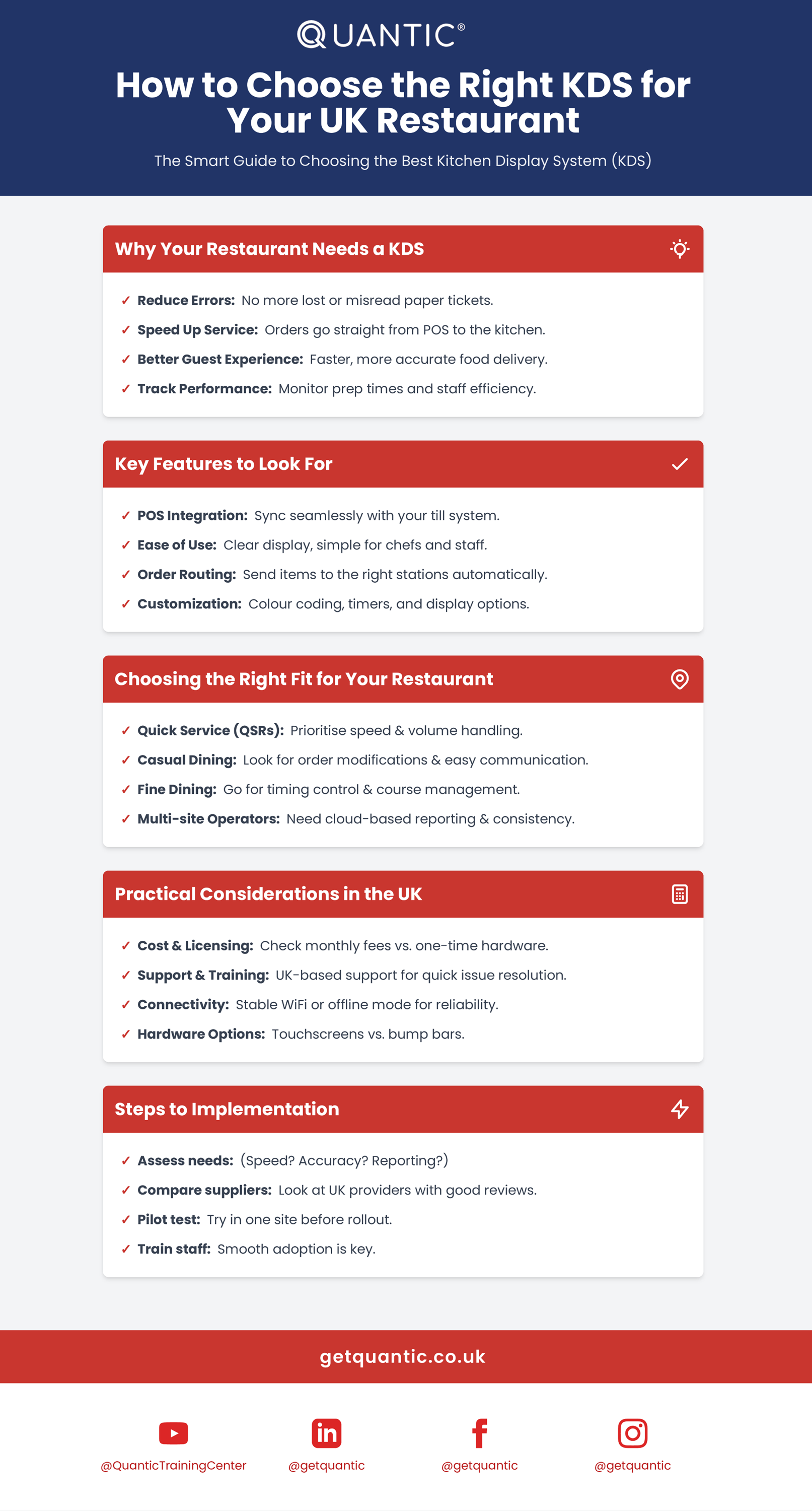
How to Choose the Right KDS for Your UK Restaurant
How Kitchen Display Systems Are Shaping the Future of UK Restaurants
Looking beyond 2026, various trends are shaping how UK kitchens will use KDS technology:
- AI-assisted prep sequencing- Rather than simple first-in, first-out ordering, systems are starting to sequence tickets by actual cooking time and station load, so that the kitchen provides dishes in the order that serves a full table together.
- Deeper integration with inventory and waste tracking – Linking KDS data to inventory management helps flag menu items across every channel – POS, online ordering, and delivery platforms- the instant an ingredient runs out, rather than after a customer has already ordered it.
- Unified order management across channels- UK kitchens juggling dine-in, click-and-collect, and multiple delivery apps are moving away from a “tablet farm” of separate screens toward a consolidated KDS feed for all channels.
- Tighter allergen and compliance tooling- With UK allergen labelling rules continuing to tighten, expect KDS providers to build in a more prominent allergen flagging system as standard.
- Reporting- As waste tracking becomes more important, KDS platforms are expected to track food waste patterns by dish, not just prep-time data, which helps operators manage both cost and environmental impact.
Common Issues, Addressed
“Will it work with our existing POS?”
Most modern KDS platforms integrate with mainstream POS systems used in the UK. Compatibility issues are rare with contemporary tills. Older, unsupported hardware is more likely to need a bridge or an upgrade.
“Our kitchen is too small to need this.”
KDS isn’t only for large or multi-site operations. Independent cafés, takeaways, and single-site restaurants often see the fastest return, since even one lost ticket during a busy lunch service has an outsized impact on a small team.
“Screens will break in a hot, greasy kitchen.”
Purpose-built kitchen hardware is rated for heat, humidity, and splashes, and is considerably more durable than a consumer tablet mounted on a wall.
Quantic KDS vs Competitors: Feature Comparison
How Quantic POS is Shaping Kitchen Technology Across the UK
Quantic’s Kitchen Display System (KDS), which is a catalyst for smarter, faster, and greener kitchen operations, stands out as UK restaurants transform into a digital-first era.
Quantic’s KDS is more than just a digital ticket; it provides a range of capabilities that enable operators to provide sustainability, efficiency, and accuracy on a large scale.
1. Real-Time Order Visibility
- Real-time order visibility: Customer orders are displayed on the kitchen screens, which helps reduce the use of handwritten tickets and helps build communication between FOH and kitchen operations.
- Station-based workflows: Customer orders can be routed to designated kitchen stations, helping the preparation area focus on relevant tickets.
- Quick kitchen communication: Digital order communication and real-time visibility help kitchen staff process orders, allowing quick service.
2. Smart Order Routing and Kitchen Time Management
- Automatic order routing: The Quantic KDS can route customer orders to the designated kitchen stations, which helps staff manage tickets easily.
- Time and preparation monitoring: Cooking time, elapsed time, and countdown time monitoring help staff to track preparation progress and order prioritization.
- Enhanced Kitchen Workflow: Quantic KDS allows kitchen staff to manage their workflow and support time by station-based routing with real-time order visibility.
3. KDS Analytics and Reporting
- Kitchen visibility: KDS provides visibility to active orders and their progress across the kitchen and stations
- Preparation time monitoring: It helps kitchen staff track order preparation and ordering delays.
- Order prioritization: Quantic KDS allows order prioritization, and ticket routing helps kitchen staff manage kitchen workflow.
- Performance Insights: Order and preparation insights help restaurants identify workflow issues and opportunities.
4. Multi-Channel Integrations
- POS connectivity: Easily integrates with Quantic POS to ensure a smooth transition between front and back of house.
- Delivery & online orders: Orders received from supported channels like POS, website, and mobile apps will be sent to the KDS for kitchen processing.
- Unified workflow: With centralized KDS, orders from supported channels are easily managed, and kitchen staff have clear visibility of incoming orders.
- Improved Service: It streamlines kitchen operations and improves order visibility, that help restaurants offer quick service.
5. Empowering Staff with Easy Training
- Easy-to-use interface: Quantic KDS is easy to use, with a user-friendly interface that helps kitchen staff manage orders efficiently.
- Flexible station configuration: Restaurants can add, customize multiple stations, and select relevant KDS stations for viewing orders.
- Better workflow management: It allows order prioritization, time tracking, and ticket routing that helps restaurants manage preparation quickly.
- Staff convenience: As Quantic always states, KDS provides great convenience for staff, helping manage order preparation and completion.
6. KDS Enhancing Customer Experience
- Meal Pacing: KDS supports positioning, coursing, and order prioritization to help restaurants coordinate kitchen workflow.
- Faster order delivery: It helps to reduce waiting time and enhance kitchen efficiency, increasing real-time order visibility.
- Improved Order Accuracy: It displays item, customer, and order-level notes on tickets, helping kitchen staff follow special instructions.
- Better order status visibility: It helps staff monitor order progress across all kitchen stations and receive real-time updates from the POS.